
If you are already registered on BCS, then you can Sign In to BCS now
However, If you are a NEW member please register first by following the steps below …
An Easy Guide to BCS Registration and First Login
Introduction
Our Bowls Club Management System (BCS) has been introduced in March 2026. It is designed to streamline club operations, enhance member experience, and simplify administration. The system offers an intuitive platform where members can sign up for upcoming games, accept invitations to play, stay connected with fellow bowlers and much more.
For the 2026 season, all of our Club Friendlies, Club Events, Basingstoke Ladies League and National & County Games will be managed within BCS. You must therefore use the BCS system to sign up or be selected for any of these types of games.
*All other game types continue to be managed in the “Rink Diary” system. The intention is to move all other types of games into BCS for the start of the 2027 season.
How to Register on the BCS System
- Click here: Apply to Regsiter on BCS (and refer to the screenshot below)
- Select “Old Basing Bowling Club” from the dropdown box. Be careful not to accidentally register for a different club!
- Complete the rest of the registration form with your personal details, including your name, email address, and a secure password. Review the BCS terms and conditions and tick the box to agree.
- Submit the form by clicking “Register”. IMPORTANT: Your application will now be checked by one of our admins, to ensure it is genuinely from one of our members. This check will be done asap, but please allow up to 2 hours for the registration to be approved.
- Fig. 1 – example of BCS Registration Form

So my registration was approved. What can I do first?
When your registration is approved by the club’s admins, you will receive a confirmation email that informs you of your username. The email invites you to sign in and complete any remaining registration details.
At this point, you will first see a “Registration Complete” message that includes a couple of suggestions with links to your first steps, including adding any dates that you know you will be unavailable. You can also find this later, under “My Profile” > “My Availability”. This is a valuable tool for us and helps to ensure you are not selected for matches you cannot attend.
The next suggestion is a link to view upcoming matches. To do this again later, go to “Matches” > “Match Listing”.
IMPORTANT: Please be aware that you will not be able to sign up for any of the available games until one of our administrators grant you that right. We will do this automatically, we hope within a couple of hours of you completing registration if we are available. However, if you are still waiting after 24 hours, feel free to click “Help” to contact one of us.
When your rights are granted, you will receive a final email confirming that you are now able to sign up and be selected for available games.
You can now feel free to explore the system and get familiar with the features. Don’t worry – you can’t break anything 😊
Signing up for matches.
**IMPORTANT: It may take 1-2 hours before you can sing up for a match. You will get a confirmation email when this is ready for you.
Click on: “Matches > Match Listing”.
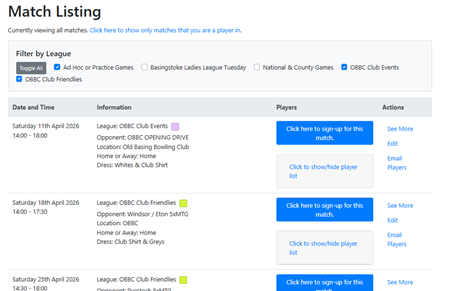
If a game is open for Sign Ups, you will see a blue box next to it. Click the blue box to sign up for the game.
The box will immediately turn green, and you will see a confirmation message: “You have successfully signed up for this match”.
*Nearer the date, the Captain will select the teams and, if selected, you’ll receive confirmation of which position and who you’re playing with.
We look forward to welcoming you to the new BCS system and we hope it enriches your experience here at Old Basing Bowling Club.
Leave a Reply